

I run multiple businesses, and I’ve always tried to find ways to keep everything together in one place without switching tabs every 5 seconds.
Last year, I found Missive (thanks to Linda), which does a really good job with the email management part. But it doesn’t have other things I need, like taking notes, or setting reminders, or any useful AI functionality. So I’m forced to use Evernote and combine it with Notion.
I’ve tried a lot of other tools, and I mean a lot, but none of them actually gives me everything I need precisely. And of course, why would they? They didn’t build the software for me.

This January, like I do every January, I was decluttering and prepping for the new year. Unsubscribing from emails, cleaning up my slack, deleting random notes I don’t remember writing. I was moving from Missive to Evernote to Notion.
Then I had a wild idea.
Why not just build exactly what I need? No more, no less.
Now, you’d ask, what do I even need?
Simple: A single dashboard that has tasks, resources/links I want to keep close, notes, reminders, a video gallery, and AI functionality like a daily briefing. Oh, and it needs to connect to my WhatsApp so I can capture things on the go.
I wrote out the rough draft of what I wanted.
Initially, I was going to do it on Windsurf. Then I thought of every pain I’d have to go through to get this thing working properly: frontend, backend, database, server, deployment. It’s going to be a lot of work, and although I was ready for the work, the wiser version of me thought... what if it could be easier?

I’ve used Lovable before, but only to build UI prototypes and play around with a fancy Netflix clone.
So I did some digging. The comments on Reddit weren’t even encouraging; people had mixed opinions. One guy even said, and I quote, “Only fools will think they can build anything useful with Lovable.” 😂

But I decided to go through Lovable’s documentation and saw that they have the entire ecosystem built in. The server, the AI, the database, everything.
“This should make everything easier”, I said to myself.
Then I concluded, “let’s give Lovable a shot”.
Now came the UI part. I didn’t want an ugly, scattered UI. I wanted it dark, simple, without any fancy elements. I love the UI of linear.app, so I figured I’d just copy their design.
Luckily, a good Samaritan published a Linear UI design kit on Figma. I duplicated that, plugged Figma MCP with Windsurf, and told Windsurf to give me the instructions I should give Lovable to achieve something close to that design. The lovable design theme functionality also made it smoother.
Then I got to work.
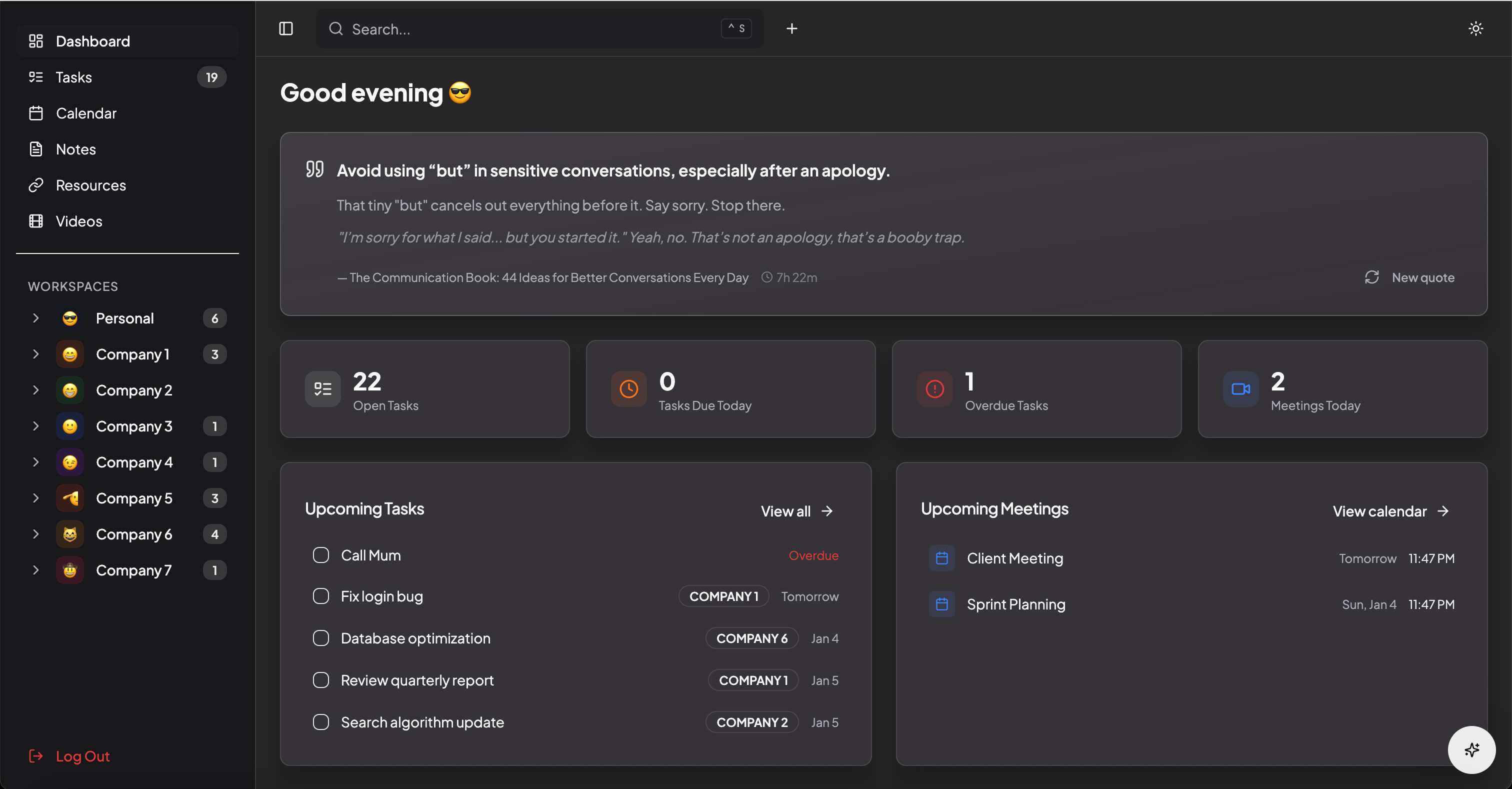
What I Built…
After 14 hours, I had a fully functional personal dashboard. Here’s a demo video:
I called it “Odogwu”, which is slang for “champion” or “big man”. Because why not?
The dashboard has:
Tasks → with drag-and-drop reordering, priorities, and the ability to tag tasks to different workspaces (which is something I was unable to do with Missive).
Notes → with rich text editing, tags, and reminders. If I mark a note with “remind me”, it’ll show up in my daily briefing and send me a WhatsApp message as a reminder.
Resources → for saving links and bookmarks I want to keep close.
Videos → a Netflix-style gallery for YouTube, Instagram, and TikTok videos I plan to watch. Once I mark them as watched, they disappear from the UI but stay in the database.
Calendar Integration → pulls from my Google Calendar, shows the next 7 days of meetings, detects clashes, and even auto-tags meetings based on attendee email domains.
Daily Briefing → AI-generated summary of the day, with tech news from the past day.
Just exactly what I need for now, and if anything else comes to my mind, I’ll add it, because the world is mine.

The WhatsApp Magic (and Frustration)
This was the feature I was most excited about, and also the most frustrating.
The idea is simple: I’m walking somewhere, and I remember something. Instead of opening a dashboard, I can just send a WhatsApp message like “I need to call my mum by 2 pm tomorrow”, and the AI adds it as a task and sends me a reminder at 2 pm the next day.
It worked.
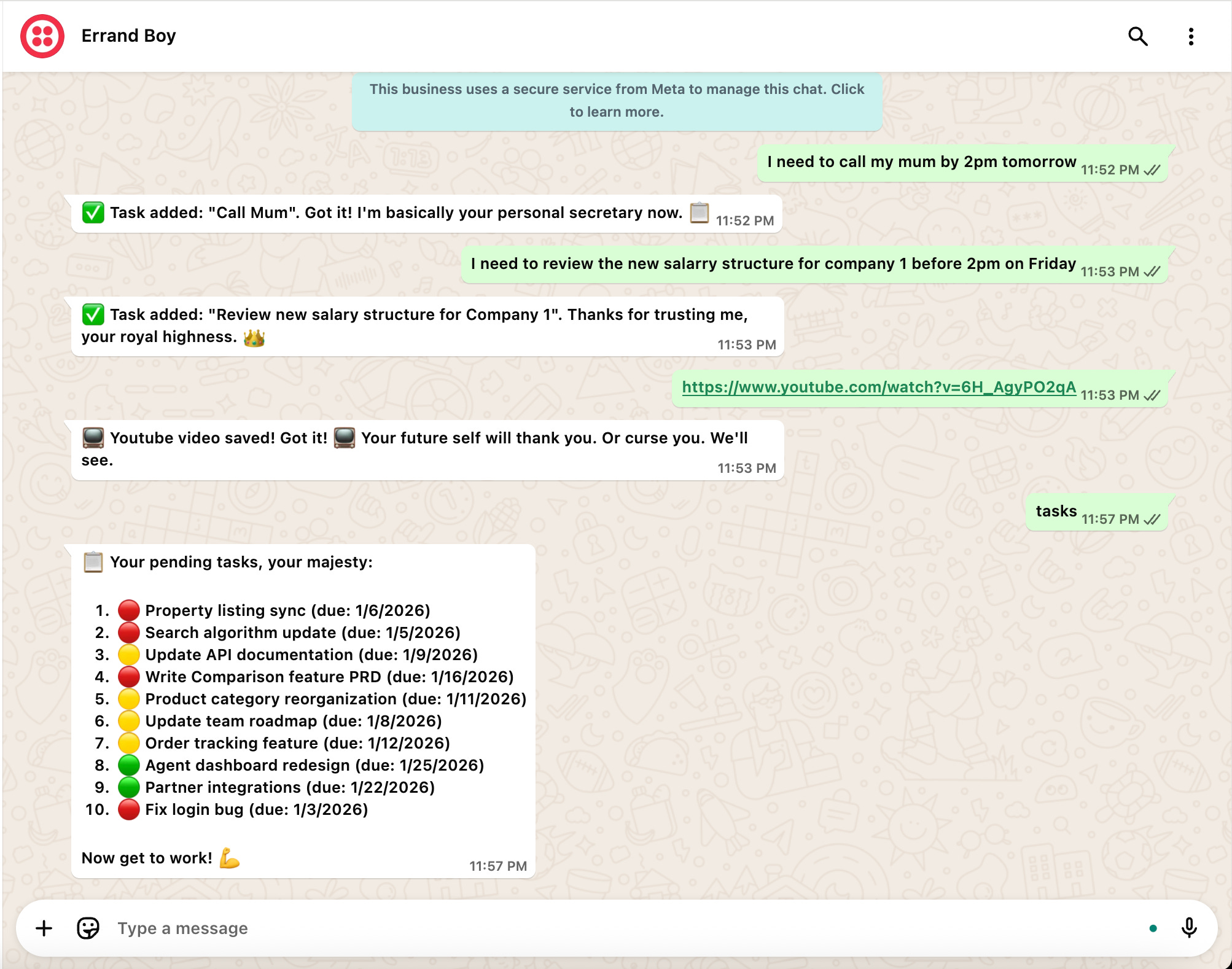
And when I logged in to the dashboard, the tasks I'd sent on WhatsApp were already in the task list.
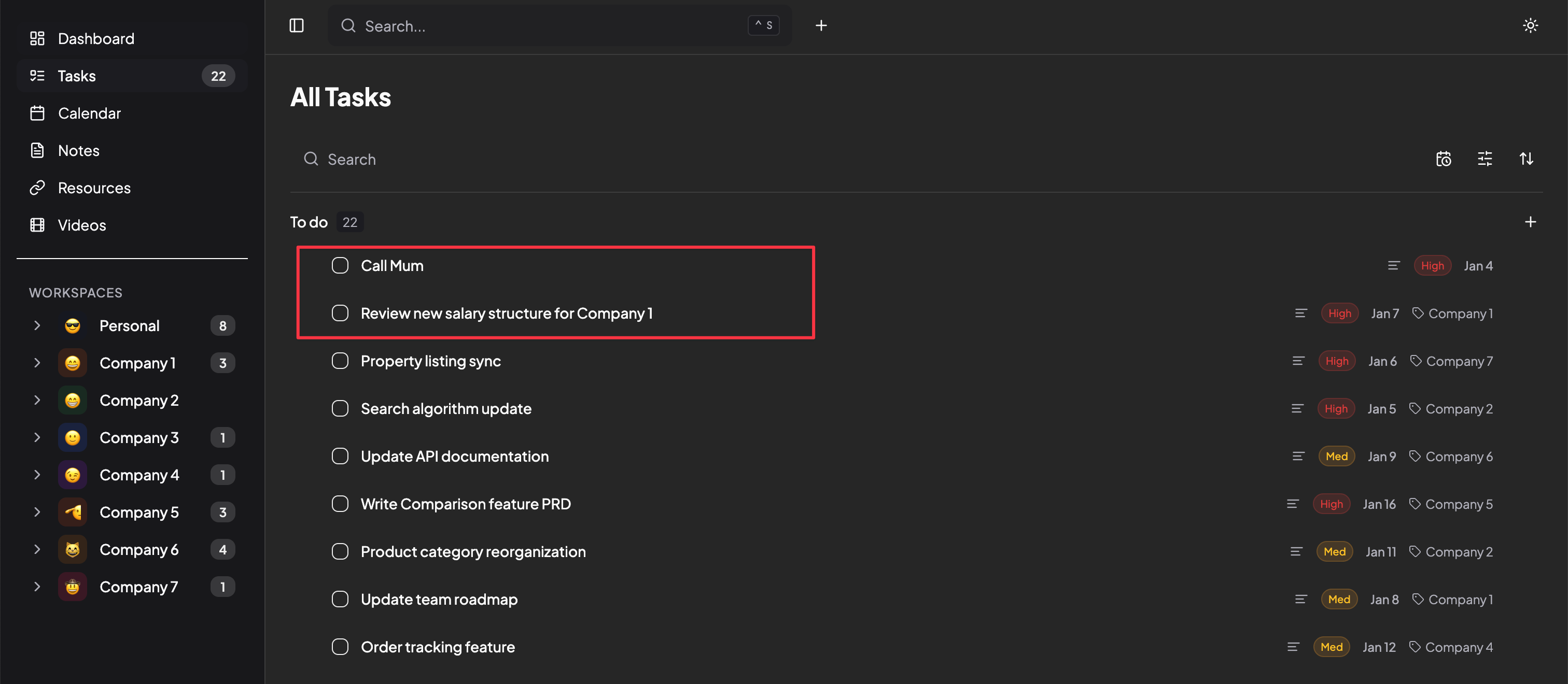
But here’s where the frustration came in.
To do anything with WhatsApp API, Meta requires this annoying Meta Business verification. I was hoping to avoid it, because this is just a simple personal project.
But my plan didn’t work. After 3 hours of suffering and trying, I eventually settled on using the Twilio sandbox number, which doesn’t require verification but does require me to reconnect it every 3 days by sending a message like “join kay-odogwu” to the Twilio WhatsApp number.
It’s annoying, but I’ll leave it that way for now.
What Surprised Me About Lovable
I didn’t need any deep prompt engineering to get Lovable to understand what I wanted. The prompts were very loose and lazy.
For example, when I wanted to add the videos module, this is exactly what I sent:
“Let’s add a videos module. It’ll take only either YouTube link, Instagram or TikTok link. Then we’ll have a page for it as videos I need to watch. It’ll be a fancy video gallery display, like Netflix. It’ll have a checkbox to mark it as completed. Once I mark it completed, remove it from the UI, but keep it in the database. If I send any YouTube, Instagram or TikTok link to the WhatsApp via Twilio, just know to add it as a video.”
It took a few corrections, but it worked just fine. I think this is what John meant when he said “there’s a new programming language, called ‘English’”.

Other Hiccups Along the Way
The WhatsApp situation wasn’t the only challenge. A few other things came up:
News scraping issues → I wanted the daily briefing to include tech news headlines. The initial implementation kept returning image URLs instead of actual article links.
AI response parsing → Sometimes the AI would wrap its JSON responses in markdown code blocks, which broke things.
Google Calendar authentication → This required some manual work with JWT creation and cryptographic signing. Not the most fun part.
Some points to reduce frustration:
My rule of thumb is: once I've gone back and forth with it more than three times and it still hasn't fixed the issue, I’ll open the code and try to fix it myself. Which means having a basic understanding of programming makes it easier, but it's not required.
Reference other sections/pages/files where something you’re trying to do has already been done properly e.g “On the videos page, the filter and button should be beside the search bar, similar to how it is on notes page.“
If you have any UI reference or screenshot, attach it; it’s faster.
A Quick Disclaimer
This kind of project would require a much deeper look if I were pushing it out for public use, especially around optimisation, security, and scalability. But for a personal project? It’s solid. It does what I need it to do, and that’s all that matters.
The Takeaway
Interestingly, we’re in an era where you can build your own tools. Not just theoretically, but practically.
If there’s something you’ve been wishing existed, something that combines features from 5 different apps into one, you might be closer to having it than you think.
Sometimes, your best productivity tool is the one you build yourself.
Now, if you’ll excuse me, I need to go send “join kay-odogwu” to my errand boy on WhatsApp.
WOW!! That's so 😎 cool!! I want to build for me too.